Gaming PC diagnostic guide
ARGB Lights Stay Dark After a Cooler Change
Published by MASHFiX Computer Repair and Data Recovery ·
Fans spin but the new cooler lights stay dark? Check the separate lighting path and exact connector specification before changing software or wiring.
Shut down and unplug the PC before inspecting lighting connections. Identify the cooler, motherboard and any lighting hub; do not move a plug to another header merely because it looks similar.
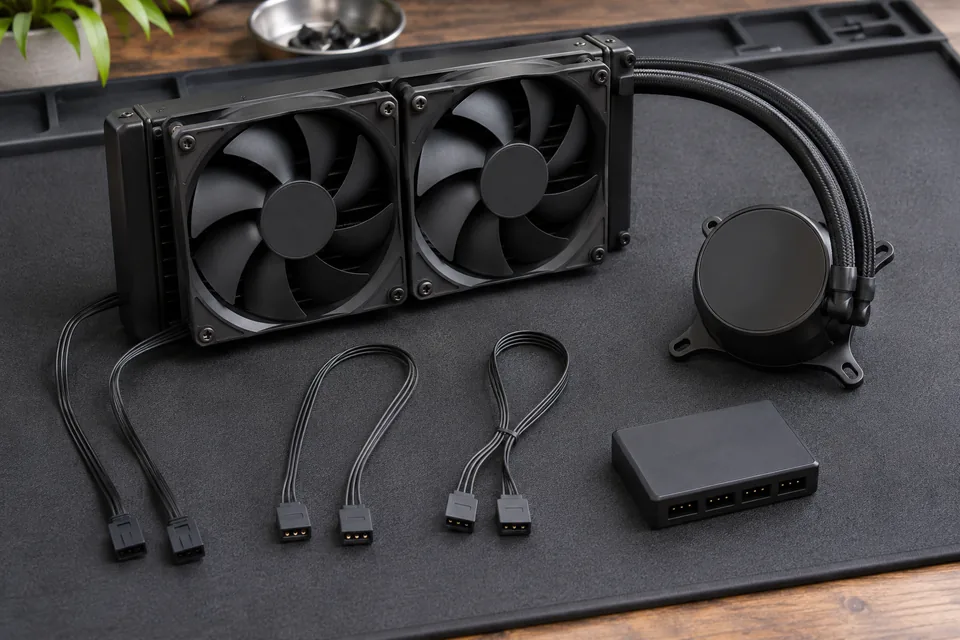
What this symptom can mean
The fan motor, pump and decorative lighting can use different power and control paths. Spinning fans therefore do not prove that the LEDs are connected correctly. A dark light can involve an unplugged lead, controller, unsupported software path or damaged lighting equipment, while cooling performance needs its own check.
Case lights work but the replacement cooler is dark
The old lights may be controlled through a different hub or system. Trace the new cooler’s intended path rather than assuming every visible light shares one controller.
The plug seems to fit another header
Connector shape alone is insufficient. MSI documents separate 12V four-pin JRGB and 5V three-pin JRAINBOW systems; proprietary connections need their own product instructions.
Safe checks before service
- Record whether the fans and pump operate normally and whether CPU temperature is behaving normally. Stop if cooling is uncertain.
- Read the exact cooler and motherboard manuals, including the lighting connector pinout and any hub power requirements.
- Photograph accessible connections with the system unplugged. Hide serial numbers, asset labels and personal case stickers.
- Note which control software was used before the cooler change and whether the hardware is a retail board or part of a prebuilt system.
Do not connect a 5V ARGB device to a 12V RGB header, force a proprietary plug or reconnect LEDs while powered. Installing another lighting application cannot correct an incompatible electrical connection.
What professional diagnosis should separate
- 01
Separate cooling from lighting
Mashfix can assess actual cooling operation independently of the decorative LEDs.
- 02
Map the control chain
The documented device, hub, motherboard connection and supported controller software can be compared with the installed arrangement.
- 03
Explain the result
The next step may be a supported connection correction, compatible controller or failed-lighting evaluation. A software reinstall is not automatically the answer.
What helps a DFW service assessment
For Dallas or Fort Worth gaming-PC support, provide the cooler and motherboard models and a list of hubs or adapters. Describe whether the lights ever worked and which parts changed. Avoid removing the cooler itself to investigate a lighting lead; that can disturb a functioning thermal installation.
Ask the technician to confirm both the lighting result and normal cooling after any authorized change. Some prebuilt control arrangements differ from retail examples, and support for a particular lighting application must be verified rather than promised.
Lighting troubleshooting should not require erasing Windows or storage. Save work before shutting down and keep account credentials out of photographs or requests.
Common questions
Answers before you approve a repair
Does a spinning fan prove its RGB wiring is correct?
No. Motor power and LED power or control may be separate.
Will every ARGB product work in the same software?
No. The controller, product specification and supported integration determine the software path.
Need help in DFW? Compare the Dallas shop and Fort Worth shop at Suite 100, or review scheduled home and office visits. We confirm the service path, scope and timing before booking.
Product guidance and references
These technical resources explain the referenced behavior. Your device and situation still need their own assessment.