Cooling service diagnostic guide
Laptop Thermal Paste or Liquid Metal: Ask Before Service
Published by MASHFiX Computer Repair and Data Recovery ·
Choose cooling work around the laptop's original design and confirmed fault rather than assuming a more aggressive thermal material is always better.
Record the laptop model and actual overheating symptoms before choosing a compound. If it shuts down, smells electrical or has liquid exposure, stop repeated load tests and request assessment.
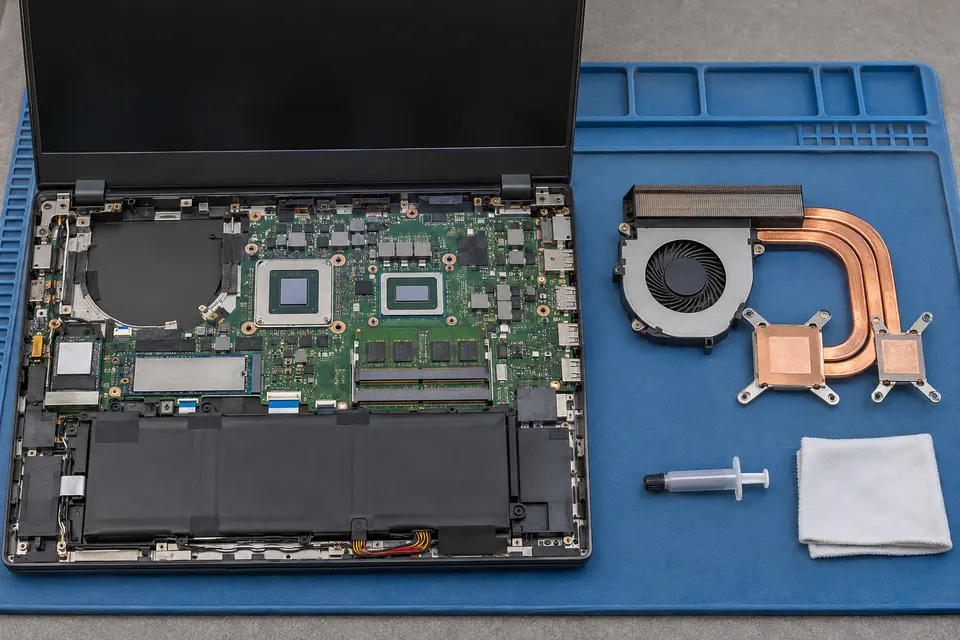
What this symptom can mean
Cooling performance depends on airflow, fan operation, heatsink contact, mounting and the intended thermal interface. A material change cannot compensate for every fan, heatpipe or board fault. Liquid metal is electrically conductive and requires design-appropriate handling; it is not a universal paste upgrade.
The laptop used liquid metal from the factory
The service plan must account for its original construction and containment. Do not assume an ordinary paste procedure is suitable.
Temperatures changed after earlier service
Mounting, contact, displaced material and other disturbed parts deserve review. Applying more compound without inspecting the assembly can miss the cause.
Safe checks before service
- Provide the exact model, previous cooling work and the workload associated with heat or shutdown.
- Check that external vents are not blocked without inserting tools or liquids.
- Ask which thermal material and assembly procedure the quote proposes, and why it suits this model.
Do not apply liquid metal near unprotected electronics, mix unknown materials or use household substitutes. Do not remove a cooling assembly while powered. A temperature number alone does not identify the failed component.
What professional diagnosis should separate
- 01
Confirm the thermal problem
Mashfix can compare the reported workload with cooling behavior and other stability symptoms.
- 02
Inspect the assembly
Fans, airflow, mounting and model-specific thermal contact are considered before recommending material changes.
- 03
Validate the workload
After approved service, compare the original task and fan behavior. A brief idle temperature is not the same as sustained-load validation.
A useful cooling quote explains the work
Ask whether the job is cleaning, fan replacement, thermal-interface service or further diagnosis. These can overlap but should not be silently treated as the same repair. Part availability and the assembly's condition affect the plan.
Mashfix can assess gaming-laptop and cooling faults in DFW. Extended bench checks may be needed for shutdowns. This guide does not promise a particular compound, temperature reduction or repair result before the exact device is evaluated.
Protect important files before planned service when the device is stable enough. Repeated thermal shutdowns are not a reason to keep stressing a machine containing the only copy of data.
Common questions
Answers before you approve a repair
Is liquid metal always better for my laptop?
No. The original design, electrical risk and correct assembly matter. Choose a model-appropriate service plan.
Will new paste fix a broken fan?
No. Fan function and thermal contact are separate parts of the cooling path.
Need help in DFW? Compare the Dallas shop and Fort Worth shop at Suite 100, or review scheduled home and office visits. We confirm the service path, scope and timing before booking.
Product guidance and references
These technical resources explain the referenced behavior. Your device and situation still need their own assessment.