Gaming PC diagnostic guide
Graphics Card Sag: Support Without Straining the Card
Published by MASHFiX Computer Repair and Data Recovery ·
A heavy graphics card needs stable support, clear fans and unstrained cables. Learn when a bracket helps and when the mount needs inspection.
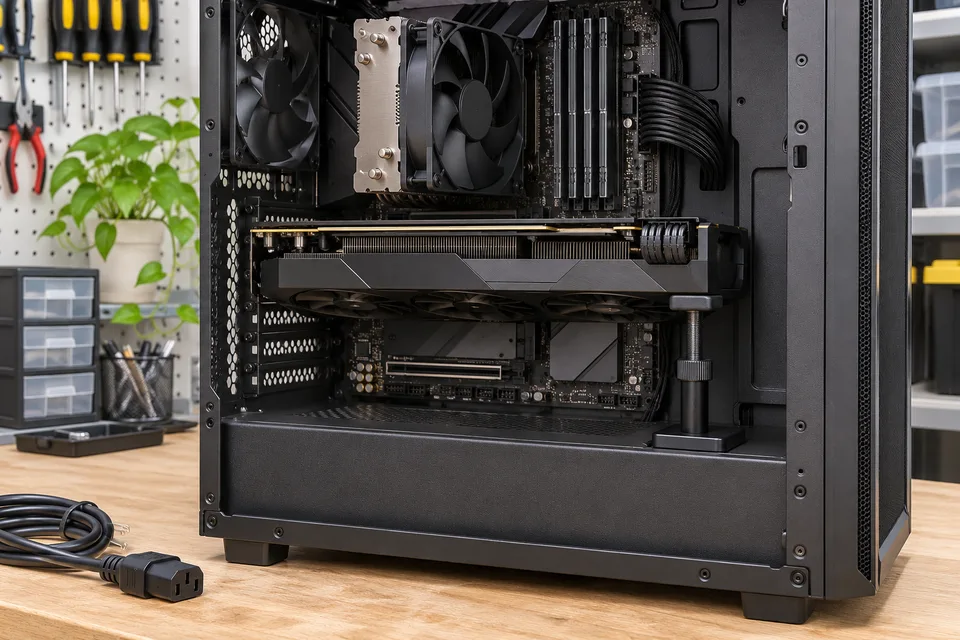
If the graphics card looks tilted, shut the PC down and disconnect external power before any internal inspection. Do not push the card level while it is running. A support bracket should stabilize a correctly installed card, rather than force a damaged or loose installation into place.
What this symptom can mean
A large cooler places weight beyond the card’s rear chassis mount. Some cards therefore use a manufacturer-specified holder or bracket. Visible tilt deserves a careful look at the mounting arrangement, but a photograph alone cannot establish a cracked board, damaged slot or the cause of a display fault. The right support depends on the actual card and case.
The outer end droops, but the PC still works
A stable picture does not tell you whether the mechanical support is adequate. Record the card and case models and whether the tilt is new, especially after the computer was transported. Avoid repeatedly moving the PC to compare angles.
A bracket touches a fan or pulls against the power cable
That arrangement needs correction before use. Support should not obstruct moving parts or create another load on a cable or connector. Raising a bracket higher is not automatically a safer adjustment.
Safe checks before service
- Look up the exact card’s installation guide and included accessories. Not every card uses the same support point or holder.
- With the PC off, observe whether the chassis mount is secure and whether a support rests on a stable surface. Do not reach inside if you are unfamiliar with safe hardware handling.
- Keep fans, wiring and removable case panels clear of the proposed support position. Ask for installation help if the bracket’s fit is uncertain.
Do not wedge loose conductive objects under the card, pull on its power leads or force it upward with an overextended prop. Stop if you see a loose socket, cracked material, damaged connector or signs of heat damage.
What professional diagnosis should separate
- 01
Check mounting before adding support
Mashfix can inspect the card’s attachment, case alignment and visible condition. A bracket cannot substitute for a properly secured chassis mount or repair a damaged expansion slot.
- 02
Select the intended contact point
ASUS describes holders that rest on a sturdy case base and just support the card at the specified housing location. A technician should follow the applicable product instructions, rather than copy another card’s contact point.
- 03
Separate stability from electrical symptoms
If the PC also loses video or shows artifacts, those symptoms need their own controlled diagnosis. Adding a bracket is not proof that the GPU, connector or motherboard is electrically healthy.
Prepare a useful Dallas or Fort Worth inquiry
Send the graphics-card model, case model and a description of any recent transport or hardware change when requesting help. A photograph taken without moving components may help explain the concern, but it cannot replace an inspection. Mashfix can discuss a suitable assessment before you purchase a holder or replacement graphics card.
Before a planned assessment, back up important files if the computer operates reliably. If there is visible damage or an electrical smell, leave it off instead of starting a demanding game to see whether the support helped. Describe any separate display problem during intake.
Common questions
Answers before you approve a repair
Does every heavy graphics card need the same anti-sag bracket?
No. Case layout, card design and manufacturer instructions determine the suitable support. Some cards include a holder; another model may use a different arrangement. Check fit and fan clearance before installation.
Can a support bracket fix game crashes?
A bracket addresses mechanical support. A crash can have unrelated software, power, temperature or hardware causes. Report both the visible sag and the crash, without assuming one explains the other.
Need help in DFW? Compare the Dallas shop and Fort Worth shop at Suite 100, or review scheduled home and office visits. We confirm the service path, scope and timing before booking.
Product guidance and references
These technical resources explain the referenced behavior. Your device and situation still need their own assessment.