Laptop diagnostic guide
Broken Laptop Keycap but It Still Types: Repair Scope
Published by MASHFiX Computer Repair and Data Recovery ·
A working switch under a broken keycap needs a mechanism and parts check. Keep the pieces and avoid glue or force before choosing the repair scope.
Keep the loose keycap and every small piece. Shut down before inspecting it, and do not press the cap back by force or glue it into the keyboard.
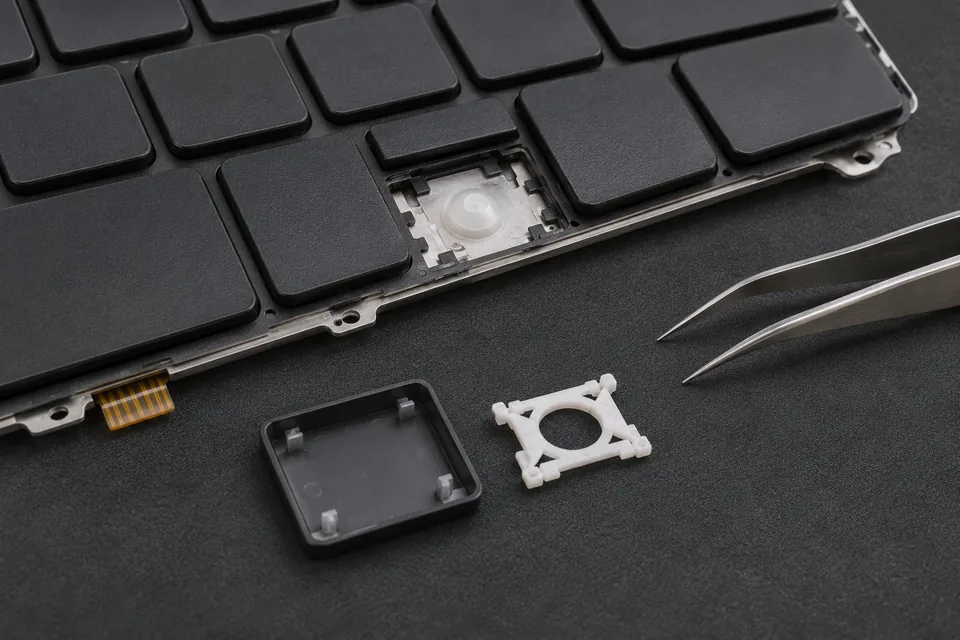
What this symptom can mean
The cap, retaining mechanism, stabilizer and electrical input are different parts of the typing action. A character still registering does not prove the plastic attachments are intact. Conversely, a missing cap does not automatically mean the entire keyboard’s electronics have failed. The repair options depend on the model and damaged parts.
Cap is loose but the mechanism appears intact
Model-specific inspection can determine whether reseating is appropriate. Appearance from above cannot confirm that the tiny underside clips remain usable.
Spacebar or another wide key rocks at one end
Wide keys can include stabilizers as well as retainers. A cap from a similar-looking keyboard may not match the attachment points.
Safe checks before service
- Retain loose pieces in a small protective container and note which key they came from.
- Record whether the character registered normally before the cap came off; do not repeatedly press an exposed mechanism.
- Provide the exact laptop model, keyboard language and backlight option when requesting an assessment.
- Use an external keyboard as a temporary input option if it does not require disturbing damaged parts.
Glue can immobilize moving parts, contaminate switches or complicate replacement. Do not remove neighboring keycaps to learn the clip pattern. Similar model names can use different keyboard suppliers and retainers.
What professional diagnosis should separate
- 01
Mechanical condition
Mashfix can inspect the cap clips, retainer, stabilizer and keyboard attachment points.
- 02
Input function
The electrical response and any wider failed-key pattern can be checked separately from the visible damage.
- 03
Feasible repair scope
Depending on damage and compatible parts availability, the route may be reseating, a compatible component or a keyboard/top-case assembly. Timing and availability require confirmation.
Ask what the proposed repair will restore
Describe whether your priority is a loose cap, a missing letter, inconsistent input or a damaged wide key. Those are different acceptance checks. A satisfactory result should include normal travel and reliable typing without forcing the mechanism.
For Dallas or Fort Worth laptop service, send a clear damage photo with personal stickers and screen details excluded. Do not purchase by keycap shape alone. Some manufacturer service routes supply only complete keyboards; third-party component availability varies. A small visible part does not guarantee a quick or inexpensive repair, and no same-day completion should be assumed before evaluation.
Keyboard assessment should not require resetting the laptop. Keep passwords private; a harmless local text field is enough to describe a typing symptom.
Common questions
Answers before you approve a repair
If the letter still appears, can I just glue the cap?
Avoid glue. The key needs controlled movement and intact attachment points, which adhesive can damage or obstruct.
Does one broken cap always require a whole keyboard?
No universal rule applies. Model-specific construction, attachment damage and compatible parts determine the practical repair.
Need help in DFW? Compare the Dallas shop and Fort Worth shop at Suite 100, or review scheduled home and office visits. We confirm the service path, scope and timing before booking.
Product guidance and references
These technical resources explain the referenced behavior. Your device and situation still need their own assessment.